




Honegumi RAG Assistant: Agentic Code Generation for Bayesian Optimization
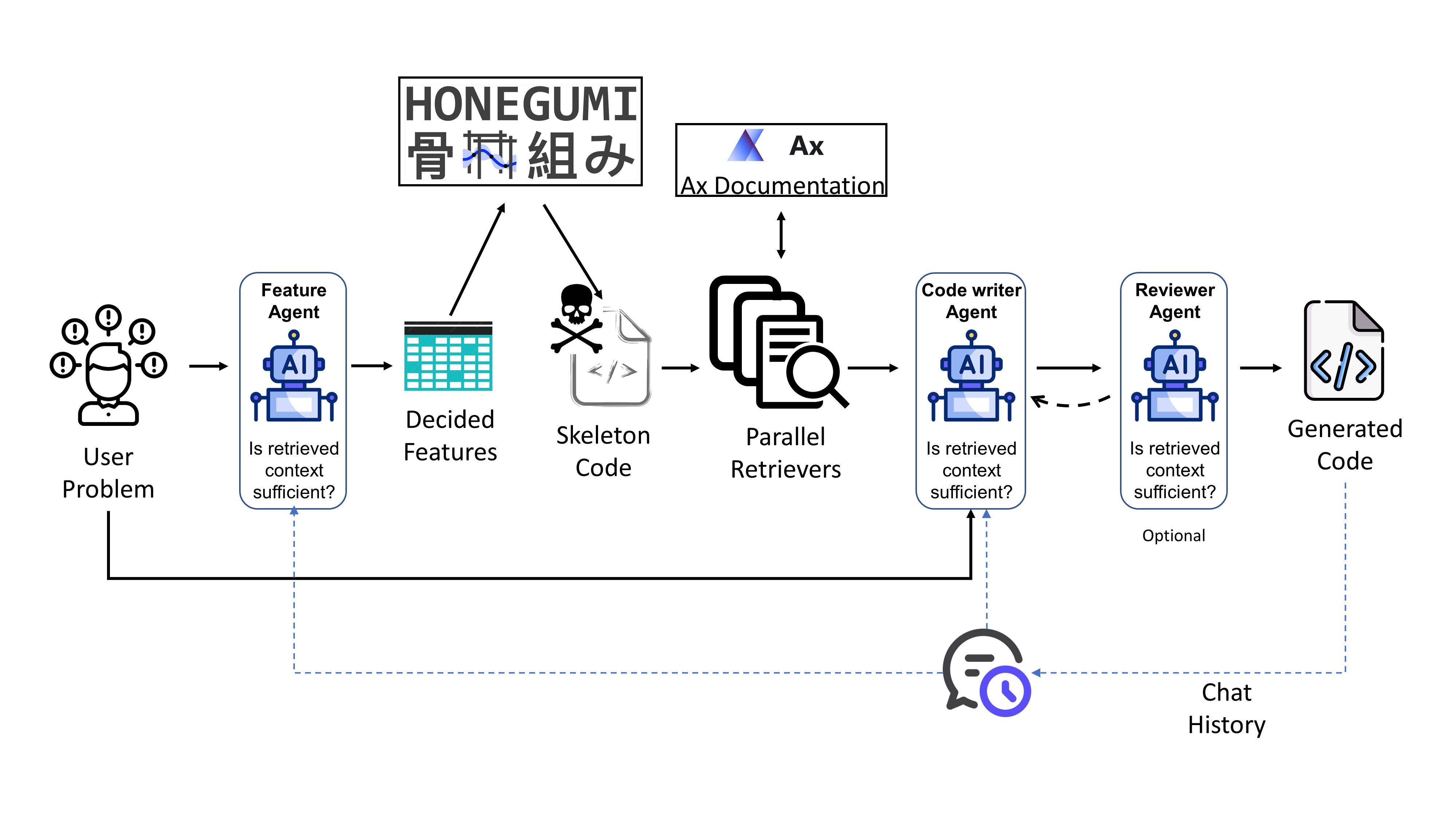
Figure: Schematic of the Honegumi RAG Assistant agentic pipeline for generating Bayesian optimization code from natural language.
An intelligent AI assistant that converts natural language problem descriptions into ready-to-run Bayesian optimization code using Meta’s Ax Platform
Overview
Honegumi RAG Assistant is an advanced agentic AI system that automatically generates high-quality, executable Python code for Bayesian optimization experiments. Built on top of Honegumi, it uses LangGraph and OpenAI GPT models to orchestrate multiple specialized agents that collaborate to understand your optimization problem, retrieve relevant documentation, and generate production-ready code using the Ax Platform.
Honegumi provides deterministic skeleton code generation based on problem parameters, and this RAG Assistant enhances it by retrieving relevant Ax Platform documentation to help the LLM transform the skeleton into complete, domain-specific code tailored to your problem.
Simply describe your optimization problem in plain English, and the assistant produces complete, runnable code tailored to your specific requirements.
Key Capabilities
Natural language to code: Describe optimization problems conversationally
Intelligent RAG: Parallel retrieval of relevant Ax documentation to supplement skeleton code
Built on Honegumi: Leverages Honegumi for deterministic skeleton generation
Multi-agent architecture: Specialized agents for parameter extraction, retrieval planning, and code writing
Flexible model selection: Mix GPT-5 and GPT-4o models for cost-performance optimization
Key Features
Multi-Agent Architecture
Parameter Selector: Analyzes problem and extracts optimization parameters (objective, constraints, task type etc.)
Skeleton Generator: Uses Honegumi to create deterministic code templates
Retrieval Planner: Intelligently generates retrieval queries based on problem complexity
Parallel Retrievers: For efficient documentation retrieval - multiple queries executed concurrently to minimize latency
Code Writer: GPT-5 powered code generation with streaming output
Reviewer (optional): Quality assessment and revision requests (disabled by default for speed)
Advanced Features
LangSmith Integration: Full tracing support for debugging and monitoring
🛠️ Prerequisites
Conda (Miniconda or Anaconda)
Python 3.11+
LangSmith API key (optional)
📘 Google Colab Tutorial
To help you get started quickly, we’ve prepared an interactive Google Colab tutorial:
Google Colab Tutorial: Getting Started with Honegumi RAG Assistant
In this tutorial, you’ll learn how to:
Install Honegumi RAG Assistant and all necessary dependencies on Colab
Set up API keys using Colab Secrets
Build a vector store from Ax Platform documentation
Describe your optimization problem and generate code
View the generated code in your Google Drive
The tutorial runs entirely in Colab—no local setup required. All you need is access to your Google Drive and valid OpenAI/LangSmith API keys.
Installation
Quick Install via pip
Create & activate a conda environment
conda create -n honegumi_rag python=3.11 -y
conda activate honegumi_rag
Install via pip
pip install honegumi-rag-assistant
Configure your API keys
Honegumi RAG Assistant will automatically look for a file named
.envin your current working directory (or any parent) and load any keys it finds.In the folder where you’ll run the CLI (or in any ancestor), create a file called
.envcontaining:OPENAI_API_KEY=sk-... LANGCHAIN_API_KEY=lsv2_...
Build vector store (one-time setup)
For best results with documentation retrieval, build the vector store:
# Run the build script from the package
python -m honegumi_rag_assistant.build_vector_store
Note: By default, this uses Ax v0.4.3 (matching honegumi). To use a different version:
python -m honegumi_rag_assistant.build_vector_store --ax-version 0.4.0
Run the assistant
honegumi-rag
From Source: Clone & Run
Clone the Repository:
git clone https://github.com/hasan-sayeed/honegumi_rag_assistant.git
cd honegumi_rag_assistant
Create Conda Environment (recommended):
conda env create -f environment.yml
conda activate honegumi_rag_assistant
Install in editable mode:
pip install -e .
Configure API Keys:
In the project root directory, create a file called
.envcontaining:# Required: OpenAI API Key for LLM and embeddings OPENAI_API_KEY=sk-your-actual-openai-api-key-here # Optional: LangChain for tracing (recommended for debugging) LANGCHAIN_API_KEY=your-langchain-api-key-here LANGCHAIN_TRACING_V2=true LANGCHAIN_PROJECT=Honegumi RAG Assistant # Optional: Path to FAISS vector store (if using RAG) AX_DOCS_VECTORSTORE_PATH=data/processed/ax_docs_vectorstore RETRIEVAL_TOP_K=5
Build Vector Store for RAG:
For best results with documentation retrieval, run:
# Build vector store (one-time setup, defaults to Ax v0.4.3)
python -m honegumi_rag_assistant.build_vector_store

# Or specify a different Ax version
python -m honegumi_rag_assistant.build_vector_store --ax-version 0.4.0
The vector store will be saved to
data/processed/ax_docs_vectorstore/and automatically loaded if present.Verify Installation:
honegumi-rag --help
# Or: python -m honegumi_rag_assistant --help
Usage
Run the assistant:
honegumi-rag    # if you installed via pip
# Or: python -m honegumi_rag_assistant
The assistant will prompt you to describe your Bayesian optimization problem in natural language:
Your problem:
Optimize temperature (50-200°C) and pressure (1-10 bar) for maximum yield in a chemical reaction.
After typing your problem description, press Enter. The assistant will process your problem and generate code in real-time (streaming), displaying it as it’s created.
By default, code is only printed to the console (not saved). To save the generated script to a file, use --output-dir:
honegumi-rag --output-dir ./my_experiments
Optional: Enable debug mode to see detailed agent decisions:
honegumi-rag --debug
Command Line Arguments
Argument |
Description |
Default |
|---|---|---|
|
Save generated script to specified directory (if omitted, code is only printed, not saved) |
|
|
Enable debug mode with detailed logging |
|
|
Enable Reviewer agent (slower, more accurate) |
|
|
Model for Parameter Selector |
|
|
Model for Retrieval Planner |
|
|
Model for Code Writer agent |
|
|
Model for Reviewer agent |
|
Model Selection Guide
Recommended (Best Quality):
--param-selector-model gpt-5 \
--code-writer-model gpt-5 \
--retrieval-planner-model gpt-5
Budget (Faster, Lower Cost, Lower Accuracy):
--param-selector-model gpt-5-mini \
--code-writer-model gpt-4o \
--retrieval-planner-model gpt-5-mini
Project Organization
├── AUTHORS.md              <- List of developers and maintainers
├── CHANGELOG.md            <- Changelog to keep track of new features and fixes
├── CONTRIBUTING.md         <- Guidelines for contributing to this project
├── LICENSE.txt             <- MIT License
├── README.md               <- This file
├── environment.yml         <- Conda environment specification
├── .env.example            <- Example environment variables (COPY TO .env)
│
├── configs/                <- Configuration files
│
├── data/
│   ├── raw/                <- Original, immutable data
│   └── processed/          <- Processed data (vector stores)
│       └── ax_docs_vectorstore/  <- FAISS vector store for Ax docs
│
├── src/
│   └── honegumi_rag_assistant/
│       ├── __init__.py
│       ├── __main__.py     <- CLI entry point
│       ├── orchestrator.py <- LangGraph pipeline orchestration
│       ├── app_config.py   <- Settings and configuration
│       ├── states.py       <- State definitions with custom reducers
│       ├── extractors.py   <- Pydantic schemas for structured extraction
│       ├── build_vector_store.py  <- Build FAISS vector store
│       └── nodes/          <- Agent implementations
│           ├── parameter_selector.py   <- Parameter extraction
│           ├── skeleton_generator.py   <- Honegumi skeleton generation
│           ├── retrieval_planner.py    <- Retrieval query generation
│           ├── retriever.py            <- Parallel FAISS retrieval
│           ├── code_writer.py          <- GPT-5 code generation
│           └── reviewer.py             <- Code quality review
│
├── scripts/
│   ├── batch_process.py    <- Batch processing utility
│   └── test_vector_store.py <- Vector store testing
│
├── tests/                  <- Unit tests (pytest)
└── docs/                   <- Documentation
Advanced Topics
LangSmith Tracing
Enable comprehensive debugging:
Get API key from https://smith.langchain.com/
Add to
.env:LANGCHAIN_API_KEY=your-key LANGCHAIN_TRACING_V2=true LANGCHAIN_PROJECT=Honegumi RAG Assistant
View all LLM calls, agent decisions, and timing in LangSmith dashboard
Citation
If you use Honegumi RAG Assistant in your research, please cite:
@software{honegumi_rag_assistant2025,
  title = {Honegumi RAG Assistant: Agentic Code Generation for Bayesian Optimization},
  author = {Sayeed, Hasan Muhammad},
  year = {2025},
  url = {https://github.com/hasan-sayeed/honegumi_rag_assistant}
}
Contributing
We welcome contributions! Please see CONTRIBUTING.md for guidelines.
How to contribute:
Fork the repository
Create a feature branch (
git checkout -b feature/amazing-feature)Commit your changes (
git commit -m 'Add amazing feature')Push to the branch (
git push origin feature/amazing-feature)Open a Pull Request
License
This project is licensed under the MIT License - see LICENSE.txt for details.
Acknowledgments
Built with PyScaffold
Skeleton generation by Honegumi
Uses Meta’s Ax Platform for Bayesian optimization
Feedback & Feature Requests
This project demonstrates a proof of concept of what’s possible with agentic systems for Bayesian optimization code generation. While Honegumi RAG Assistant works out-of-the-box for many scenarios, your use case may involve more complex pipelines, custom constraints, multi-objective optimization, or specific modeling needs.
Have something bigger in mind? Want Honegumi RAG Assistant to handle advanced features, integrate with your workflow, or adapt to your domain?
We’d love to hear from you!
Open a GitHub issue
Start a GitHub discussion
Or reach out directly at hasan.sayeed.71.93@gmail.com
Let’s shape the future of agentic systems in optimization—together.
Support
For questions, bug reports, or feature requests:
GitHub Issues: https://github.com/hasan-sayeed/honegumi_rag_assistant/issues
Email: hasan.sayeed@utah.edu
Note
This project has been set up using PyScaffold 4.6 and the dsproject extension 0.7.2.